
What really happens when you click Buy Now?
You click Buy Now, Log In, Submit, or Save.
The interface responds almost instantly.
But behind that simple interaction, a surprising number of systems may be working together:
User
  ↓
Browser
  ↓
Frontend
  ↓
HTTPS Request
  ↓
API
  ↓
Authentication
  ↓
Authorization
  ↓
Backend
  ↓
Cache / Database
  ↓
Background Jobs
  ↓
Response
  ↓
Browser
The goal of this article is to follow that journey and understand what actually happens inside a modern web application.
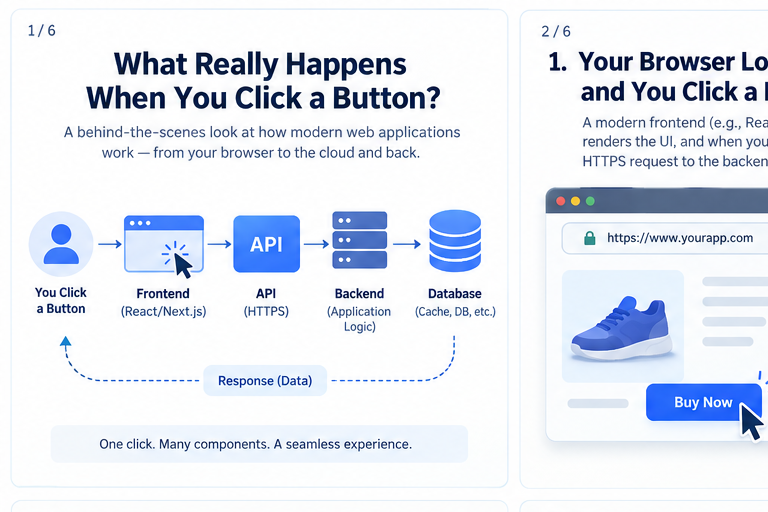
1. The Browser Loads the Application
Before you can click anything, your browser needs to load the application.
A typical modern application may use React, Next.js, Vue, or another frontend framework.
The browser downloads resources such as:
- HTML
- CSS
- JavaScript
- Images
- Fonts
- Application data
The JavaScript application then runs inside the browser and builds the user interface.
For example, an e-commerce page might display:
Product
Price
Quantity
[ Buy Now ]
At this point, most of the application logic is still running on the client side.
The interesting part begins when you interact with the page.
2. You Click a Button
Imagine you click:
[ Buy Now ]
The frontend needs to tell the backend what you want.
It may create an HTTP request such as:
POST /api/orders
Content-Type: application/json
Authorization: Bearer <token>
with data like:
{
  "productId": "prod-123",
  "quantity": 1
}
The browser sends this request over HTTPS.
The important point is that the frontend normally does not directly modify the database.
Instead, it communicates with the application's API.
3. The API Receives the Request
The API is the entry point between the frontend and backend services.
Depending on the architecture, this could be:
- REST API
- GraphQL API
- RPC endpoint
- API Gateway
- Backend-for-Frontend layer
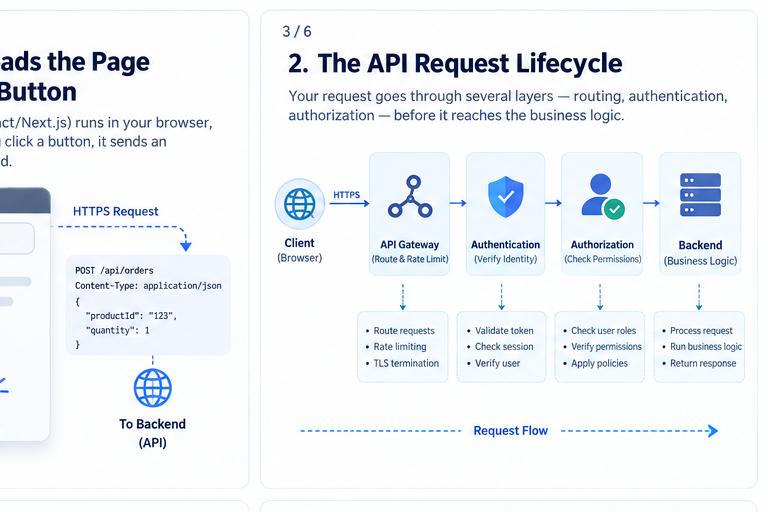
A request might travel through several layers:
Browser
   ↓
CDN / Edge
   ↓
API Gateway
   ↓
Authentication
   ↓
Authorization
   ↓
Backend Service
Each layer has a specific responsibility.
API routing
The API determines which operation the request represents.
For example:
POST /api/orders
might be routed to:
Order Service
Rate limiting
The API may also check whether the client is sending too many requests.
This helps protect the application from:
- accidental request storms
- abusive clients
- bots
- denial-of-service patterns
4. Authentication: Who Are You?
Before processing a protected operation, the backend needs to know who is making the request.
This is authentication.
A common pattern uses an access token:
Browser
   ↓
Access Token
   ↓
API
   ↓
Identity Provider
   ↓
Authenticated User
The token may contain claims such as:
{
  "sub": "user-123",
  "email": "user@example.com"
}
The server verifies that the token is valid before continuing.
Authentication answers:
Who are you?
But that's only half of the problem.
5. Authorization: What Are You Allowed to Do?
After authentication comes authorization.
Suppose the user is authenticated.
That doesn't automatically mean they can:
- delete an account
- access another user's data
- issue refunds
- modify product prices
- access an administrator dashboard
The backend checks permissions.
Authenticated User
       ↓
Role / Permissions
       ↓
Allowed?
    ↙     ↘
  Yes       No
   ↓         ↓
Continue    403
Authentication and authorization are different responsibilities, and production systems generally need both.
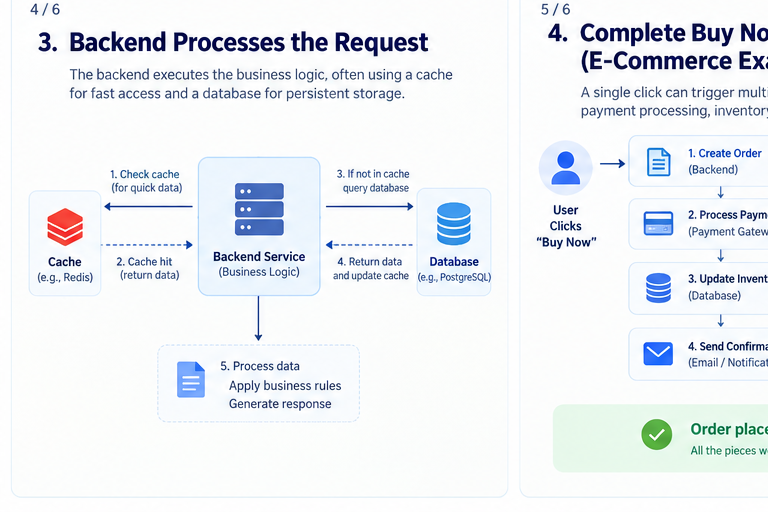
6. The Backend Executes Business Logic
Now the request reaches the backend.
The backend is where application-specific rules are executed.
For an order, the backend might need to:
- Validate the product
- Check the requested quantity
- Verify inventory
- Calculate the price
- Apply discounts
- Create the order
- Process payment
- Update inventory
- Trigger notifications
The backend may be built using technologies such as:
- Node.js
- Java
- Python
- Go
- .NET
- PHP
The technology is less important than the responsibility:
The backend enforces the application's business rules.
7. The Backend Talks to the Database
Most applications need persistent data.
For example:
Users
Products
Orders
Payments
Inventory
Subscriptions
The backend communicates with the database rather than allowing the browser to access it directly.
A simplified flow looks like this:
Browser
   ↓
API
   ↓
Backend
   ↓
Database
The database could be:
- PostgreSQL
- MySQL
- MongoDB
- DynamoDB
- SQL Server
- another managed database
For example, the backend might execute a query conceptually similar to:
SELECT *
FROM products
WHERE id = 'prod-123';
The database returns the required data to the backend.
8. Where Does Caching Fit?
Not every request needs to reach the database.
Suppose thousands of users request the same product information.
Querying the database every time can create unnecessary work.
A cache can sit between the application and database:
             ┌─────────┐
Request ───→ │  Cache  │
             └────┬────┘
                  │
             Cache Miss
                  ↓
             ┌─────────┐
             │Database │
             └─────────┘
A cache such as Redis can store frequently accessed information temporarily.
The flow becomes:
Request
   ↓
Check Cache
   ↓
Found? ── Yes ──→ Return Data
   │
   No
   ↓
Query Database
   ↓
Store in Cache
   ↓
Return Data
Caching can dramatically reduce database load and improve response times.
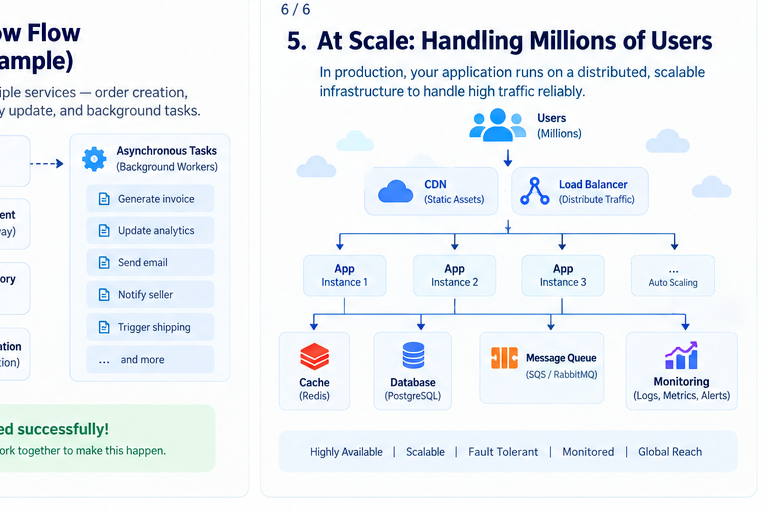
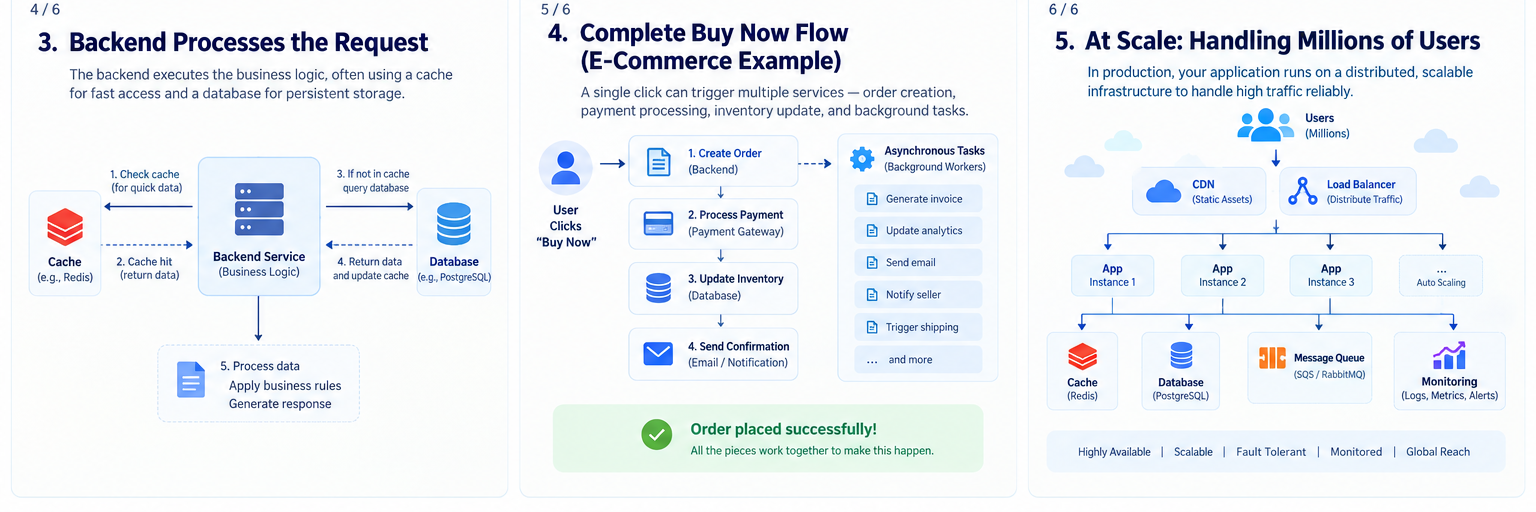
9. One Click Can Trigger Multiple Services
A modern application rarely performs everything inside one synchronous operation.
Consider the Buy Now example.
A single click could trigger:
Create Order
    ↓
Process Payment
    ↓
Update Inventory
    ↓
Send Confirmation
At the same time, additional work could happen asynchronously:
Generate Invoice
Send Email
Update Analytics
Notify Seller
Trigger Shipping
The user shouldn't necessarily have to wait for every one of these operations to finish.
This is where queues and background workers become useful.
10. Synchronous vs Asynchronous Work
Some operations need an immediate response.
For example:
Validate login
Check inventory
Create order
These are often synchronous.
Other operations can happen later:
Send email
Generate report
Process analytics
Resize images
Generate invoice
These can be asynchronous.
A queue provides a buffer:
Backend
   ↓
Message Queue
   ↓
Worker
   ↓
Background Task
This architecture makes systems more resilient and allows workloads to be processed independently.
11. The Response Travels Back to the Browser
Once the backend finishes the operation, it generates a response.
For example:
{
  "success": true,
  "orderId": "ord-1001"
}
The response travels back:
Database
   ↓
Backend
   ↓
API
   ↓
HTTPS
   ↓
Browser
The frontend receives the data and updates the interface.
You might see:
✓ Order placed successfully!

Order #1001
The entire process may have taken only a few hundred milliseconds.
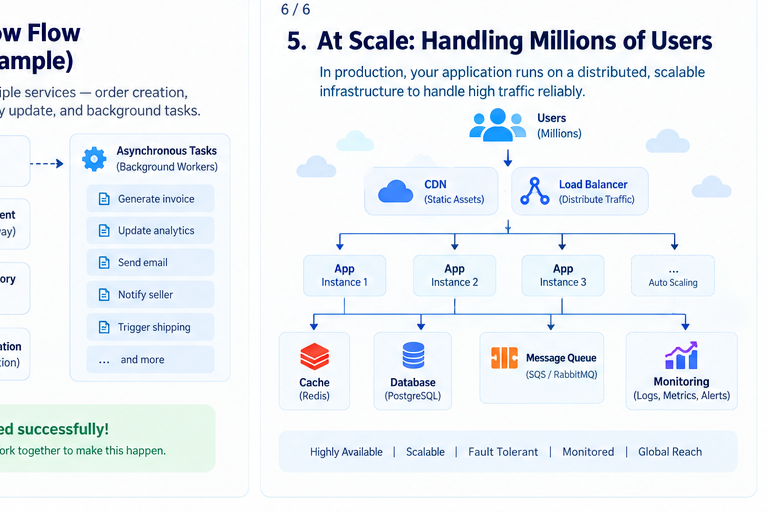
12. What Happens When Millions of Users Arrive?
Everything becomes more interesting at scale.
A single application server may not be enough.
Instead, a production architecture can look like:
                  Users
                    ↓
                   CDN
                    ↓
              Load Balancer
                    ↓
        ┌───────────┼───────────┐
        ↓           ↓           ↓
     App #1       App #2      App #3
        ↓           ↓           ↓
        └───────────┼───────────┘
                    ↓
              Cache / Queue
                    ↓
                Database
                    ↓
               Monitoring
Multiple application instances allow traffic to be distributed.
Auto scaling can create additional instances when demand increases.
13. The Cloud Doesn't Magically Make an Application Scalable
Cloud platforms provide powerful building blocks, but architecture still matters.
A scalable application usually considers:
Load balancing
Distribute incoming requests across multiple application instances.
Caching
Reduce repeated computation and database queries.
Queues
Separate workloads and absorb traffic spikes.
Horizontal scaling
Run multiple application instances instead of relying on one large machine.
Database scaling
Use appropriate indexing, replication, partitioning, or managed scaling capabilities.
CDN
Serve static assets closer to users.
Observability
Monitor:
- latency
- errors
- throughput
- CPU and memory
- database performance
- queue depth
- application health
14. What About Security?
Every layer needs to be considered.
A typical secure request path might look like:
Browser
   ↓ HTTPS
CDN / Edge
   ↓
API Gateway
   ↓
Authentication
   ↓
Authorization
   ↓
Backend
   ↓
Database
Security considerations include:
- HTTPS/TLS
- secure authentication
- authorization
- input validation
- rate limiting
- secrets management
- encryption at rest
- least-privilege access
- secure database configuration
- logging and monitoring
Security isn't one feature.
It is a property of the entire system.
15. The Complete Journey
Let's put everything together.
When you click Buy Now, a simplified production flow could be:
User
 ↓
Browser
 ↓
Frontend
 ↓
HTTPS Request
 ↓
CDN / Edge
 ↓
API Gateway
 ↓
Authentication
 ↓
Authorization
 ↓
Order Service
 ↓
Cache / Database
 ↓
Payment Service
 ↓
Inventory Service
 ↓
Message Queue
 ↓
Background Workers
 ↓
Notifications / Analytics
 ↓
Response
 ↓
Browser
That's a lot of infrastructure behind a button that looks like:
[ Buy Now ]
16. Why This Architecture Matters
Understanding this lifecycle changes how you think about web development.
A website isn't simply:
Frontend + Backend
A production application is a collection of interconnected systems.
                    WEB APPLICATION
                           │
        ┌──────────────────┼──────────────────┐
        ↓                  ↓                  ↓
     Frontend             API              Backend
        │                  │                  │
        │             Authentication         │
        │             Authorization          │
        │                  │                  │
        └──────────────────┼──────────────────┘
                           ↓
                    Cache / Database
                           ↓
                  Queues / Workers
                           ↓
                Monitoring / Operations
Each component exists because it solves a particular problem.
Common Mistakes
1. Letting the frontend access the database directly
The frontend should normally communicate through controlled backend APIs.
2. Putting every operation in one request
Long-running work should often be moved to background processing.
3. Ignoring caching
Repeatedly calculating or fetching the same information can waste resources.
4. Scaling the application but not the database
Adding application servers won't solve a database bottleneck.
5. Treating authentication as authorization
Knowing who the user is doesn't tell you what they're allowed to do.
6. Ignoring observability
If you cannot measure latency, errors, and resource usage, production debugging becomes much harder.
A Simple Mental Model
Whenever you interact with a modern web application, think:
INPUT
  ↓
CLIENT
  ↓
NETWORK
  ↓
API
  ↓
IDENTITY
  ↓
AUTHORIZATION
  ↓
BUSINESS LOGIC
  ↓
DATA
  ↓
ASYNC WORK
  ↓
RESPONSE
  ↓
USER
Once you understand this model, technologies such as React, Node.js, PostgreSQL, Redis, API Gateway, queues, containers, and cloud platforms start fitting into a much larger picture.
Final Thoughts
The next time you click a button on a modern website, remember that the visible interaction is only the beginning.
A single click can involve:
- a browser
- frontend code
- an HTTPS request
- an API
- authentication
- authorization
- backend services
- caches
- databases
- queues
- background workers
- cloud infrastructure
- monitoring
The user sees a button.
The system sees a workflow.
And understanding that workflow is one of the foundations of designing reliable, scalable web applications.
Further Reading
For deeper understanding, explore these official documentation and architecture guides:
- MDN Web Docs
- AWS Well-Architected Framework
- PostgreSQL Documentation
- Redis Documentation
- Node.js Documentation
Related reading: